


 AI-generated illustrative image
Managing members in a RideTree group – roles and options explained
Who is allowed to approve new members, change roles or remove someone from the group? On RideTree, that depends on the group role. This guide shows you member management step by step and explains which tasks admins, moderators and members can take on.
1. Open member management
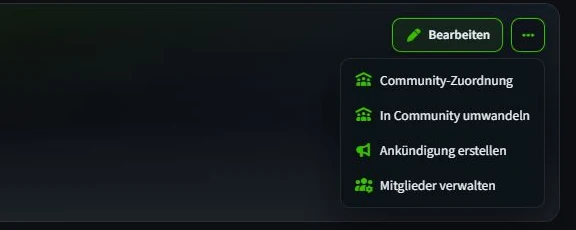
Under "My groups", open the group's profile. As a group admin, you will find "Manage members" under "More actions" at the top right. It lists active members and, if there are any, open join requests.
The normal "Members" tab on the group profile is mainly for viewing the group. For roles and requests, you need the management page.
2. Understand the three group roles
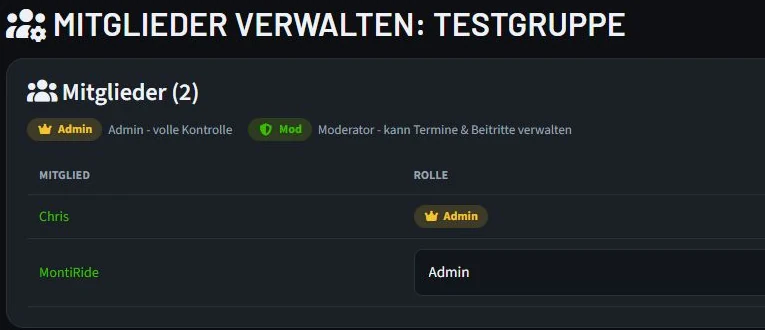
Every active person has a role. Members take part in the group. Moderators can process join requests, remove non-admins from the group and manage group events. Admins also have full group management and can assign roles.
The role is shown right next to the name. Admin and Mod are highlighted with their own badges, so you can quickly see who can take on which tasks.
3. Assign or change a role
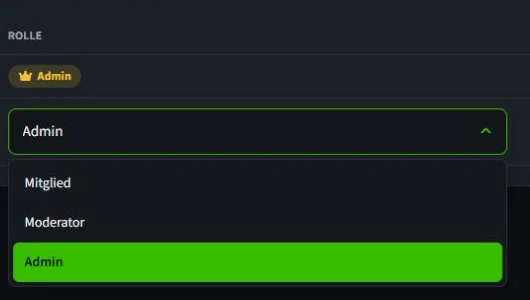
As a group admin, you can open another person's role selection and choose between "Member", "Moderator" and "Admin". The change takes effect immediately; no additional save button is needed. You cannot change your own role in this list.
Assign admin rights with care: another admin can fully manage the group and also change roles. If you later want to remove an admin from the group, an admin must first change their role to "Moderator" or "Member".
4. Accept or decline join requests
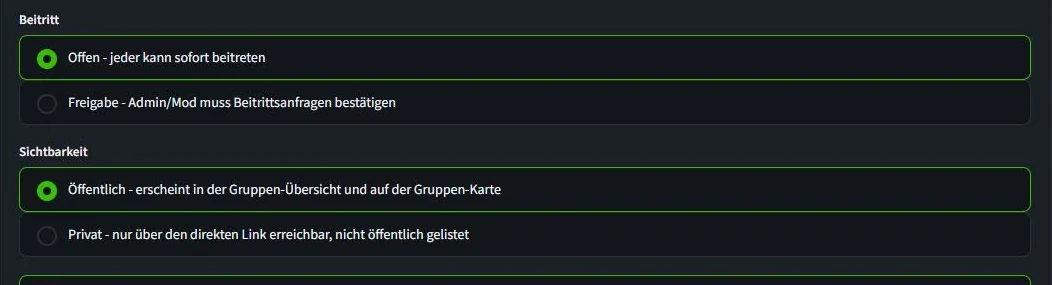
You decide whether requests arise at all under "Edit group" → "General" → "Joining". With "Open", interested people join immediately. With "Approval", they wait for a decision by an admin or moderator.
As soon as there is a request, the "Join requests" section appears on the management page. "Accept" makes the person an active member; "Decline" removes the request. Before deciding, check the person's profile and whether they suit your group.
5. Remove a member
For active members without an admin role, the "Remove" action appears. Admins and moderators can use it. RideTree asks for confirmation before removing anyone. After that, the person is no longer a member of the group.
Try to settle conflicts directly and objectively first. If removal is necessary, check that you have the right name before confirming. An admin cannot be removed directly; their role must first be changed by another admin.
A group admin cannot simply leave their own group. First make sure another member is an admin, and then have that admin change your role.
- Is joining open or by approval – and does that still suit your group?
- Do only the right people have moderator or admin rights?
- Have open requests been reviewed and decided?